Configurable promotional discount passthrough for Microsoft NCE subscriptions
Moderate Upgrade
❗ Important: This feature is currently in the Early Availability (EA) status.
Microsoft NCE promotions reduce the cost that a CSP reseller pays to Microsoft and thus the price the customer may pay. Until this release, the full promotional discount always passed through to end-customer pricing. Partners could not retain any portion as margin.
Marketplace Managers can now configure promotional discount passthrough from 0% to 100% at the marketplace level, with optional per-edition overrides on the product profile Marketplace Pricing tab. The platform applies the configured percentage to the Microsoft promotional discount before calculating the customer-facing price.
Key highlights
- Margin control — Retain part or all of a Microsoft promotional discount instead of passing it through entirely. Partners who previously did not adopt promotion behavior because of the inability to control margin impact may now configure passthrough before going live.
- Default unchanged — The marketplace default is 100% passthrough. No configuration change is required if you continue passing the full discount to customers.
- Reconciliation preserved — Microsoft promotion metadata remains on every transaction. The Sync Tool does not flag false discrepancies when passthrough is below 100%.
- Updated customer messaging — Checkout and subscription views no longer show a headline discount percentage. Customers see generic promotion messaging; at 0% passthrough, promotion messaging is hidden.
How passthrough works
When a purchase is eligible for promotional pricing, the platform uses the edition override on the Marketplace Pricing tab if one exists; otherwise, the marketplace default applies. The portion of the Microsoft discount not passed through is retained as partner margin.
❗ Important (for partners): Review your Microsoft Partner Agreement before changing passthrough. Microsoft promotional discounts count as Customer Discounts under your MPA; Maximum Resale Price obligations are based on the applicable Customer Discount (ERP minus the Microsoft Promotion). If you set passthrough below 100%, you keep part of the promotional discount as margin and are responsible for meeting your MPA passthrough and Maximum Resale Price requirements. Review MPA Channel Terms and consult your legal counsel before changing passthrough. AppDirect does not guarantee your MPA compliance and is not liable for Microsoft audit findings related to how you pass through promotional discounts to customers.
Configure marketplace-level passthrough
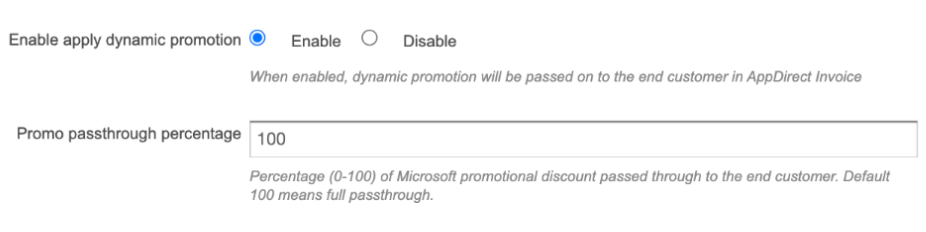
- Go to Manage > Marketplace > Settings > Billing Functionality.
- Ensure Enable apply dynamic promotion is enabled.
- Set promotional discount passthrough to a value from 0% to 100% (default 100%).
Configure edition-level passthrough (optional)
Edition-level settings override the marketplace default for that edition only.
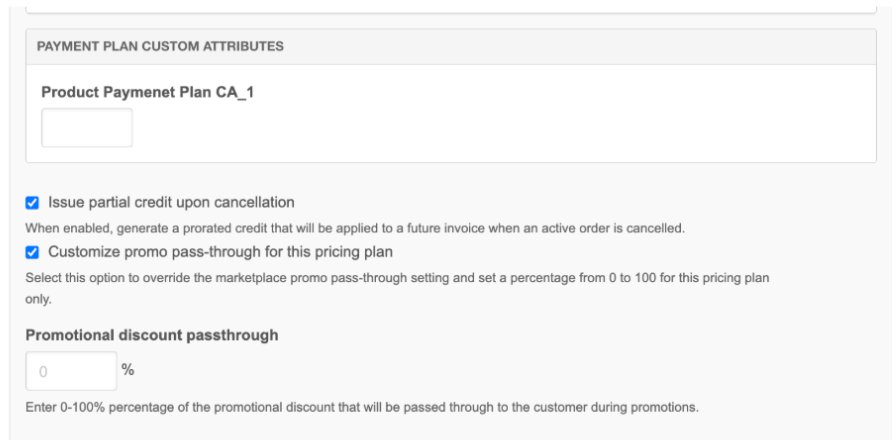
- Open the product profile via Edit Product and go to the Editions & Pricing tab.
- Select the edition with a production pricing plan.
- Navigate to Payment Plan Custom Attributes.
- Select the Override checkbox Customize promo pass-through for this pricing plan to reveal the passthrough field.
- Set the edition passthrough percentage and then Save.
Feature enablement
This feature is not enabled by default. Contact your AppDirect technical representative to request it.
Setting enablement
The following settings must be complete:
- Enable the Enable apply dynamic promotion setting. Go to Manage > Marketplace > Settings > Billing Functionality. In the Subscriptions section, enable Enable apply dynamic promotion.
- Set promotional discount passthrough.
Documentation
Documentation will be updated with the release. For existing guidance on Microsoft promotions, refer to Applying promotions for Microsoft NCE subscriptions.
Was this page helpful?
Tell us more…
Help us improve our content. Responses are anonymous.
Thanks
We appreciate your feedback!